OnePlus’s first watch wasn’t a big hit, but this second one feels like a much more confident effort. It’s now possible to get longer battery life, though sometimes it comes at the cost of things that can be annoying in everyday use.
Specifications
| Price | 329 € |
| Dimensions, weight | 47 x 46.6 x 12.1 mm, 49 g (without strap) |
| Display | 1.43″ AMOLED (466 x 466 pixels) |
| Battery | 500 mAh |
| SoC | Snapdragon W5 Gen 1 and BES2700BP |
| Memory | 32 GB storage, 2 GB RAM (4 GB eMMC for RTOS) |
| Operating systems | Wear OS 4 + RTOS |
| Connectivity | GPS/Glonass/Beidou/Galileo, NFC, Bluetooth 5.2, WiFi 2.4 GHz & 5 GHz |
| Compatibility | Android 10 or newer |
| Sensors | Accelerometer, gyroscope, heart rate, SpO2, ambient light, barometer |
| Water and shock resistance | 5 ATM, IP68, MIL-STD-810G |
Software and launch
The first OnePlus Watch only ran the company’s own RTOS. The OnePlus Watch 2 mostly runs Google’s Wear OS 4. Devices like Samsung’s Galaxy Watch6 family run on the same core OS.
On March 4, the Watch 2 went on sale in two colors: Radiant Steel and Black Steel. The price starts at 329 euros. There is only one type that works with WiFi; there is no cellular version that works on its own.
Competition
Samsung’s Galaxy Watch line is the Watch 2’s main competitor. You can get older Galaxy models for well less than 200 euros. The newest models start at less than 300 euros for basic models and go up to more than that for Classic-style models. Some might say that the Classic Galaxy models look more like OnePlus phones.
Huawei is also a clear rival, and its models are made for different kinds of people. This Huawei watch is most likely the most similar one. The base model costs around 250 euros on the street.
In the box and charging
There is a black strap, a charging puck, and a USB-C to USB-A wire in the box that comes with the black Watch 2. It takes about an hour for the empty battery to charge.
Design and display
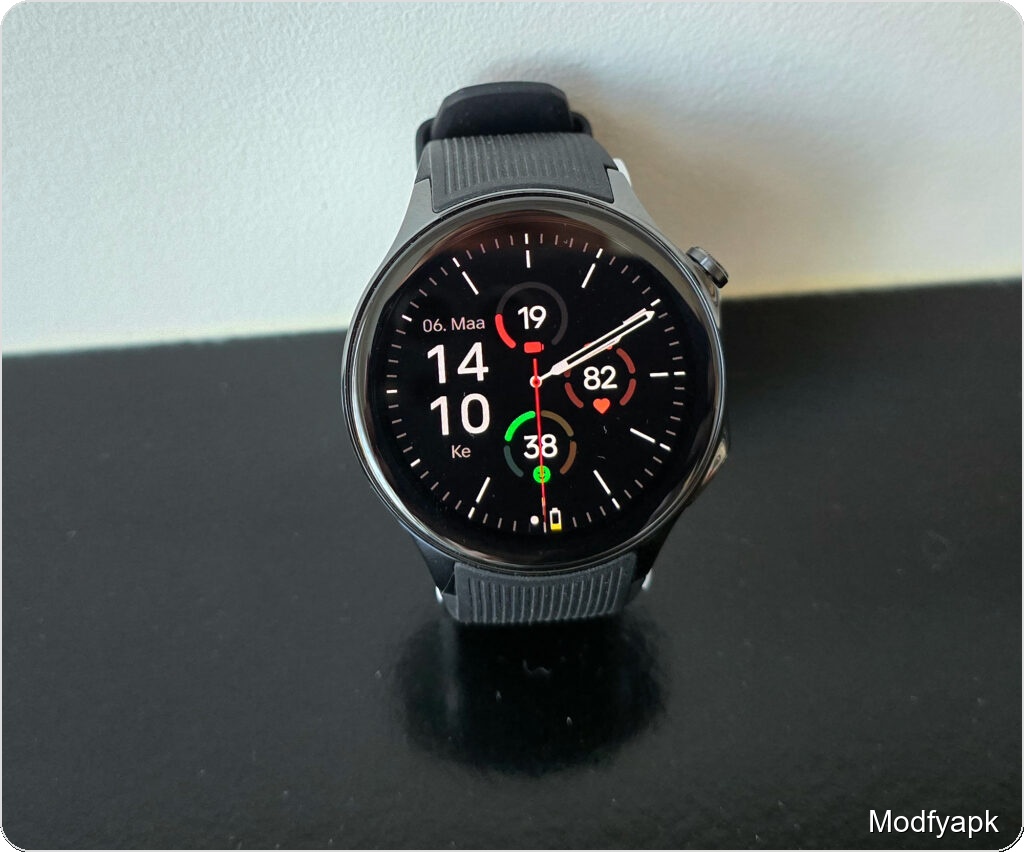
The Watch 2 looks like it was made with care. It has a 1.43-inch AMOLED screen with 466 x 466 pixels in the middle.
The screen is clear and the right size. I don’t like how dim it gets when the lighting is set to automatic. It’s fine inside, but when it’s bright outside, the screen dims slowly, so quick glances sometimes have to wait a beat. The usual brightness setting does make the battery last longer, which is something that OnePlus seems to care about.
The case is about 47 mm thick, with dimensions of 47 mm x 46.6 mm x 12.1 mm. There is a sensor bump on the top that makes it 13.7 mm thick.
The simple and stylish stainless steel case is mostly flat.
Controls and strap
Every button is on the right side. The crown-shaped button on top opens the app grid or takes you back to the watch face. It looks like a crown that can be turned, but it doesn’t move the screen. Press and hold twice to open the most recent app.
By default, the lower button starts the workout menu, and pressing it twice opens Google Wallet. Both buttons can be changed in a lot of ways.
The fluoroelastomer strap that comes with it is strong, but it can feel a little damp. It has a standard 22 mm width and quick-release pins, so it’s easy to switch to a smaller band. I quickly moved to a lighter strap so that I could work out and feel better.
The glass is sapphire crystal, which doesn’t break easily. During the test time, there were a few bumps that didn’t leave any marks.
Dual-processor approach and sensors
The Watch 2’s unique tech is its two-processor design, which is meant to save battery life. Every day, a low-power BES2700 chip does things like monitor sleep, count steps, send messages, and show the time. The watch changes to the Qualcomm Snapdragon W5 Gen 1 platform when you need GPS or apps that need more power. It’s also possible to pay for things without touching them.
Setting it up is easy. With the OHealth partner app for Android, you can control the watch and see information about your health at the same time. iPhones and the Watch 2 can’t connect to each other.
Wear OS 4 with an RTOS companion
Because the phone has two chips, Wear OS 4 is the main operating system, and OnePlus’s RTOS runs in the background instead.
Full-face views that look like tiles are used for things like sleep, weather, and exercise goals in Wear OS 4. You use touch movements to move around those. You can pinch to make the app grid bigger or smaller, and the top button lets you get to it. As you pull down from the top edge, settings will show. To see notifications, swipe up from the bottom.
The design works well for everyday use. You rarely need to go into the app grid because most things can be done from the watch faces. You can trust that swipes and taps will work, and you can get third-party apps from the Play Store.
One big problem is that the program promises updates for only two years.
Battery life
That’s how much power the Watch 2 has. Based on what OnePlus says, the smart battery mode can last up to 100 hours, which is about four days. It can also last up to 48 hours of heavy use.
Tests showed that those claims were true. I wore it for about 95 hours before it turned off by itself. In that test, the watch stayed linked to a phone, and I used GPS to track my daily exercise for about an hour. When the stated battery level hit about 5 percent, the device would sometimes shut down in the middle of an action. This was likely due to strict safety shutoffs.
Even though the screen was set to stay on all the time (except at night), the watch still lasted for about two days on a single charge. These are great runtimes for a Wear OS device—at least twice as long as you’d normally get from a Galaxy Watch6 Classic with the same amount of use.
There are pros and cons. If the watch goes into a power-saving mode or sleeps while you’re taking a shower, for example, it may take a while to get back to full functionality because the device has to restart. The process of resuming can take almost a minute, which seems long. That trait can be turned off, but it will drain the battery faster.
Health and activity tracking
Heart rate, SpO2, accelerometer, gyroscope, environmental light sensor, and barometer are all well covered by sensors. Some Samsung watches, like the Gear S2, can track ECG and blood pressure, but not the Watch 2.
Most of the time, heart rate readings were accurate and stayed within a few percent of values from other devices.
But the watch’s scores for exercise and sleep seemed pessimistic and weren’t always accurate. During a test that lasted about two weeks, the Watch 2 often showed fewer steps, less movement, and worse sleep quality than my main comparison watch, the Samsung Galaxy Watch6 Classic 47 mm. Huawei smartphones did about the same as Samsung’s.
Step detection in daily short bursts was a clear weakness. Movements like getting up from the couch to the fridge or moving around while drawing were not always recorded. It looks like OnePlus’s algorithm likes longer, constant activity before it records movement.
Similar quirks were seen in sleep tracking. OnePlus sometimes gave naps to people who were very tired and only lasted a short time high marks, while rivals pointed out the need for better sleep habits.
When you walk or run quickly, on the other hand, the lengths and step counts were about the same as those of other watches like the Samsung and Huawei Watch GT Runner. Thanks to dual-band L1+L5 tracking, GPS lock times were great; they got a signal in 3 to 5 seconds outside.
There are many sports modes on the watch, such as yoga, dance, running, riding, and swimming. Some of the running variables that are used to measure technique are cadence and ground contact time.
One small problem is that you can’t just tap to stop a live workout; you have to swipe and choose from a menu. Besides that, it worked well to track performance, check heart rate, and estimate distance on runs.
Pros
- Excellent battery life.
- Wear OS with app support.
- Stylish design and strong build.
- Fast charging.
Cons
- Tendency to undercount some activity.
- The partner app could be more capable.
- Annoying reboots when resuming from power-save.
- The upper crown does not provide rotary input.
Verdict
The OnePlus Watch 2 is a great choice for Android users who want a smartwatch that can do a lot of different things. It doesn’t have the most health-related features, but it has the ones you need, and pairs Wear OS with an incredibly smart way to save battery life.
Build quality and battery life are two things that make the Watch 2 stand out. For a Wear OS watch, going a few days without being charged is a real plus. It also charges quickly.
It’s not a perfect tool. The health features aren’t as detailed as they are on the Galaxy Watch6; you can’t use an eSIM card, and the crown doesn’t spin to give you the tactile control that many users like. One problem is that measurements sometimes don’t show enough causal action. Another problem is that it can be slow to start up from low-power states.
Still, the OnePlus Watch 2 is a good choice if you want a Wear OS watch with all the features you need without having to charge it every night.